
Lifeboat front page › Not paid yet, the page you are on now
Order stage one of four
Stage one: the order was never paid
The lightest case. No money moved for the order, the seller never saw it, and what is left to protect is a balance, if you kept one, and your account details.
Unpaid cart or prepaid balance: separate the two
Example: an unpaid CNY 120 cart and an earlier CNY 200 wallet top-up are different records. The cart does not show that the seller was paid; the top-up does show money left your payment account. Classify each transaction before describing the problem.
| Record you have | What it supports | Next step |
|---|---|---|
| Cart screenshot only | Chosen goods and options | Keep the original links; do not describe this as a paid order. |
| Top-up receipt | A payment to the agent | Match amount, date and merchant to your money trail. |
| Order payment receipt as well | Potentially a separate paid order | Read paid but not stored and check for a seller shipment. |
A saved listing is useful for a new purchase, but check its options and stock again before reordering. Do not pay a second time merely because an old order page is unavailable.
Signs you never got past checkout
You chose items, maybe added them to a cart or created an order, but you never confirmed a payment for them. Your bank and PayPal show nothing for that order, and no receipt email arrived. On Pandagoo's archived screens this is everything up to the third purchase step, labelled "Confirm and pay", and any order still showing "Payment Pending".
The one exception is a balance. If you topped up an account balance in advance, that money left you even though no order was paid with it. For the topped-up amount, read the paid stage as well.
What is exposed when nothing was paid
Money: none, apart from a balance. Goods: none; the seller never heard about your order. What remains exposed is information. The agent holds your email address, your delivery address, possibly a phone number, and the password you chose. If the site is abandoned rather than closed properly, that data sits on a server nobody is looking after.
Records worth keeping at this stage
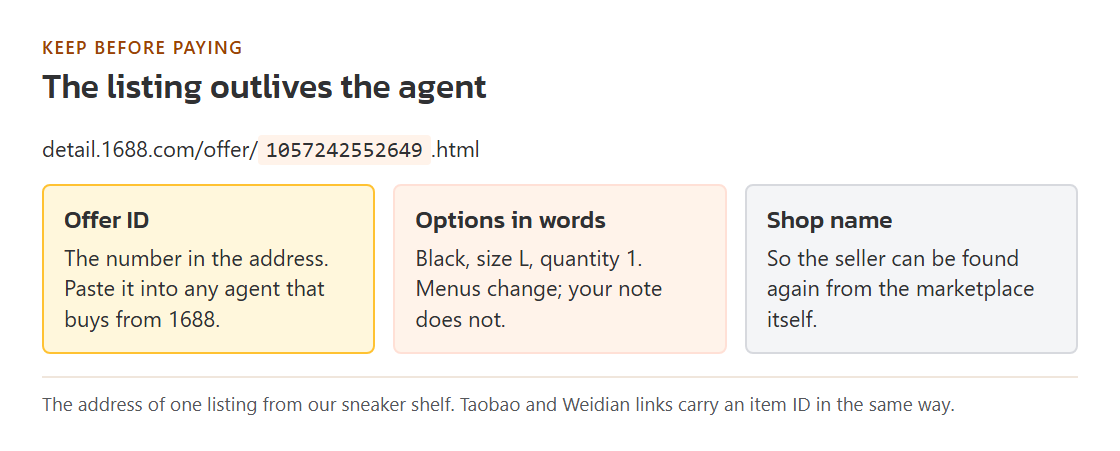
- The product links you had chosen, and for 1688 goods the offer ID, the long number in the address. The listing outlives the agent.
- Your size, colour and quantity choices, written down in words. Option menus change and you will not remember them.
- The shop name for each listing, so you can find the seller again through another service.
- If you topped up: the top-up receipt from your bank or PayPal, with date, amount and the merchant name shown on the statement.
- The email address you registered with, so you can search your inbox for anything the agent sent.
Contact order for an unpaid order
- Nobody, for the order itself. There is no money to recover and the seller has no record of you. Move the links to another service if you still want the goods.
- Your bank or PayPal, only for a topped-up balance. Ask what its process is for a merchant that has stopped trading or responding, and what it needs from you. Have the top-up receipt and a screenshot of the error page ready.
- Your own accounts. If you reused the agent password anywhere else, change it there. That is the one piece of exposure you can close today.
Hold off on these for now
- Topping up again because a half-working page says your balance is short. A failing site can still show payment buttons.
- Entering card details on a different address that uses the brand name. Several pages carry the Pandagoo name and none of them is the agent.
- Paying anyone who contacts you through social media and offers to "release" an order or refund a balance for a fee.
Pandagoo at this stage, from the archive
Pandagoo's archived purchase flow had four steps: select product purchase, verify order information, confirm and pay, then wait for the goods to be stored in the warehouse. Only the third moves money. The site also offered a prepaid balance, topped up in amounts between ¥10 and ¥5,000 at a time, and it told users to check top-ups in a dedicated history list:
“After the recharge is completed, please check the progress in the recharge record. If you have any problems, you can consult the customer service staff”
Pandagoo English interface text, saved copy of March 8, 2026, top-up reminder.
That "recharge record" was a screen inside the account. If you have no screenshot of it, the top-up receipt from your own bank or PayPal is the record that stands in for it.