
Lifeboat front page › Guide, the page you are on now
Step by step
Guide to Pandagoo and this Spreadsheet: the archived order flow, with a record to save at each step
How to go from a shelf card to a parcel at your door, rebuilt from the saved Pandagoo screens, with the one record at each step that would matter if the site went dark.
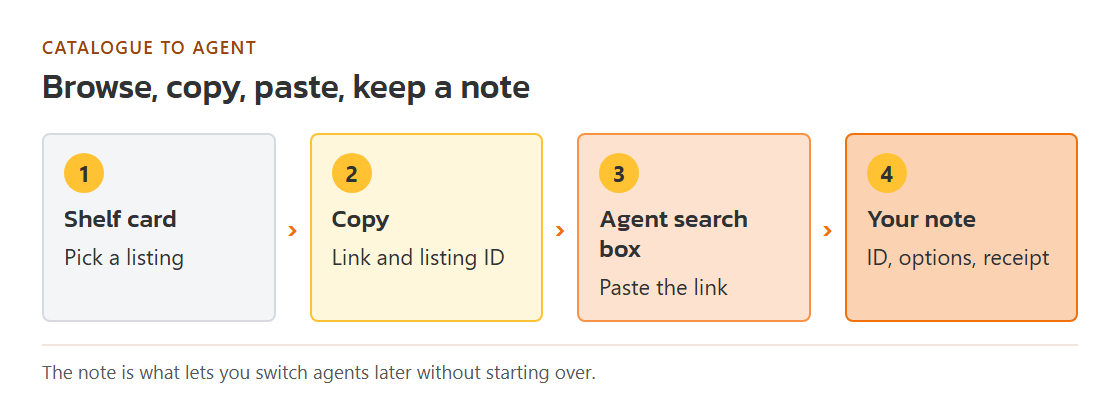
This catalogue beside any agent search box
The catalogue half of the site works the same whether or not Pandagoo ever returns. Browse a shelf on the shelf page or search from the front page, open a listing, and copy its link. Our shelf cards print the offer ID next to each product so you can keep it in your own notes. Paste the link into the search box of whichever agent you use; nearly every agent accepts marketplace links that way. Before paying, read the stage one page: it lists the two or three records worth saving while nothing is at stake yet.
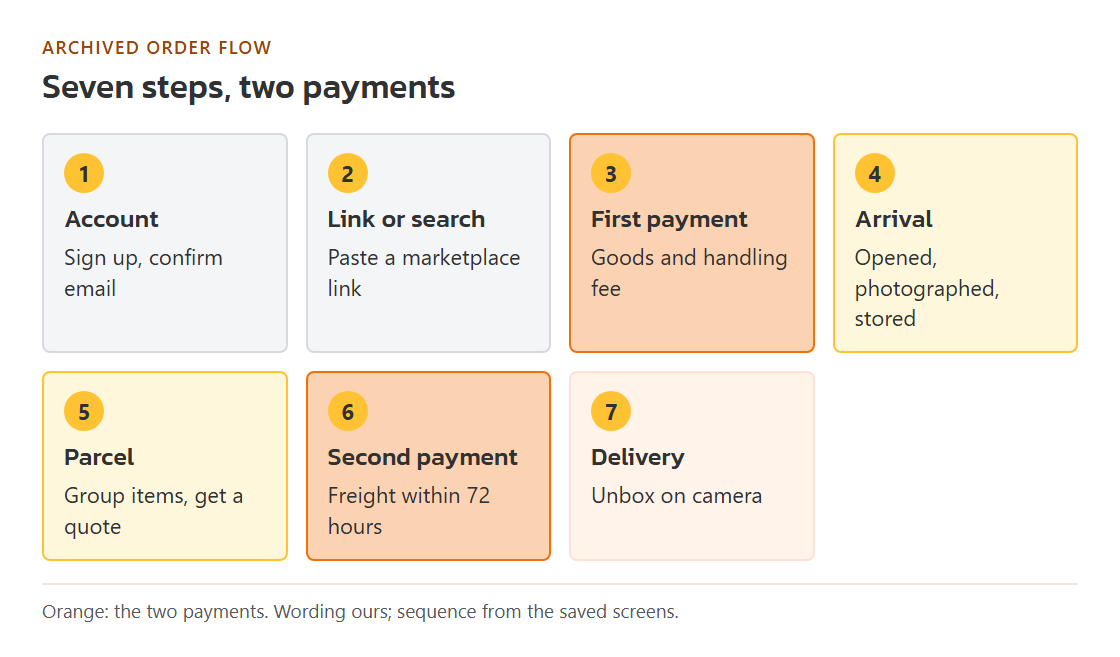
How a Pandagoo order ran, step by step
Status check on October 24, 2026: pandagoo.com forwarded to www.pandagoo.com, and that address and its sign-in page returned a Cloudflare 522 error (the server behind Cloudflare did not answer). We have not seen the site load since late March 2026. This line reports what we observed; it is not a statement about why.
These seven steps are rebuilt from the interface text in the saved copy of the site; no help pages or screenshots survive. Each step ends with the record worth keeping at that point, which is what turns an outage from a guessing game into a list.
Open an account and confirm the email
Pandagoo's sign-in page sat at the /auth address and also offered sign-in through Discord. The archived text asked new users to verify their email address before ordering and tied a shipping coupon pack to that check. Nothing could be bought without an account.
Save at this step: The email address and the sign-in method you used. If you signed in through Discord, note which Discord account; that is the key to any later recovery request.
Bring in a listing: paste its link or type its name
The search box took either a product name or a link from Taobao, Weidian, 1688 or Xianyu. A pasted link opened the listing inside the agent's site with its option menus. Items the system flagged as branded triggered a "Commodity risk warning" window; the buyer could read it and continue. Listings the system could not read went through a manual order form instead.
Save at this step: The original listing link and, for 1688, the offer ID. The copy inside the agent site disappears with the agent; the listing on the marketplace does not.
Choose options, check the order and pay for the goods
The purchase screens ran in four labelled steps: select product purchase, verify order information, confirm and pay, then wait for storage. Payment followed the archived formula: the amount for the goods plus a fixed handling fee in US dollars, divided by one minus a percentage fee. The archive keeps the formula but not the two fee values. The site's home page called this the first payment.
Save at this step: A screenshot of the confirm screen with total and options, and the payment receipt from your card, PayPal, bank or balance email.
Seller ships, warehouse receives and photographs
After purchase the order moved through "Seller Sent" while a domestic courier carried the goods to the warehouse. On arrival every package was opened for a customs check and the item was photographed: five photos by default. Goods then counted against 300 days of free storage.
Save at this step: Every inspection photo at full size, the item weight, and the date it arrived. These are your proof that the goods existed and in what condition.
Group items into a parcel and get a freight quote
From stored items you built a parcel. The archive offers a system quote (pay an estimate first, settle the difference later) or a manual quote (staff weigh the packed parcel, you pay after), and a paid trial packing called a rehearsal package. A declared value between 1 and 120 was required.
Save at this step: The list of items in each parcel, the quote, the chosen route name and the declared value.
Pay international freight within the time limit
The home page called this the second payment. The archived text gives 72 hours to pay after a parcel was submitted; unpaid parcels were cancelled automatically. Once paid, the parcel moved to pending shipment and later received an international tracking number.
Save at this step: The freight receipt and, as soon as it appears, the international tracking number and carrier name.
Delivery, unboxing and the after-sales window
The carrier delivered and any duty was settled with it. The archive allowed a short window for after-sales contact after receipt and asked buyers to keep unboxing photos and video. Return requests for goods still in China followed separate marketplace timers.
Save at this step: An unboxing video from the sealed parcel onward, photos of the label, and a note of the delivery date.
Where the guide is thin, and why
Pandagoo's help pages were loaded separately from the main program and none of them was saved. What survives is the interface text: button labels, status names, warnings and short tips. So this guide can tell you what each screen was called and what it warned about, but not the fee values, the shipping routes or the exact layout. Where a step mentions a number, the number is in the saved text; where a number is missing, we say it is missing rather than borrow one from another agent. When an official tutorial or screenshots turn up, they will go into the step they belong to.