Lifeboat front page › Four stages, the page you are on now
Stage overview
Four positions an order can be frozen in, and how to place yours
Every agent order passes through the same four positions. Which one yours occupied when the site stopped answering decides the records you need and the people who can still help.
Find your stage from the records you already hold
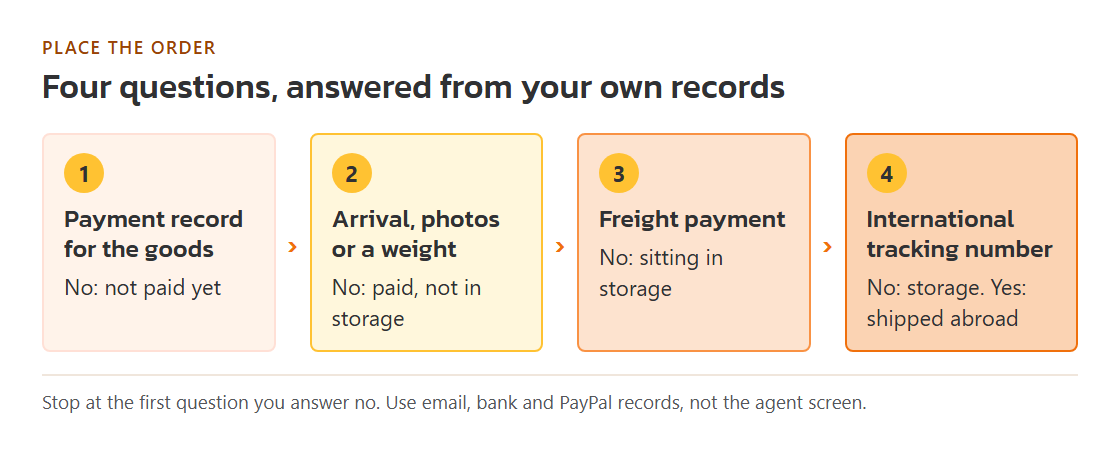
Normally you would open the agent's order screen and read the status. When the site returns an error, that screen is gone, so the stage has to be worked out from what reached you outside the site: emails, payment records and tracking messages. Work through them in this order and stop at the first one you cannot find.
- A record of paying for goods. A card statement line, a PayPal receipt, a bank transfer slip or a balance deduction email. None at all means the order never left the not-paid stage.
- A sign the goods arrived at the warehouse. An arrival email, inspection photos, or a note of the item's weight. Payment without arrival puts you at paid, not in storage.
- A record of paying for international freight. The second payment, made after a parcel was weighed and quoted. Arrival without that payment means the goods are sitting in storage.
- An international tracking number. Freight paid plus a number that a carrier recognises means the parcel is shipped abroad. Freight paid with no number is the awkward middle case covered on the storage page.
One haul can sit in three stages at once
Agents buy item by item. If you ordered a jacket from one shop and two T-shirts from another, the jacket may have reached the warehouse while the shirts were still with the seller. Treat each purchase line separately when you make your list. A parcel, on the other hand, is a single unit once it ships: everything inside it shares one tracking number and one fate. Write your list per item until the parcel stage, then per parcel.
The outage kit builder asks for one stage at a time for this reason. Run it once for each group of items that shares a stage, and keep the notes together in one folder.
Pandagoo status names mapped to the four stages
The saved copy of Pandagoo's site keeps the labels its order and parcel screens used. If you took screenshots before the site went down, or if the site comes back for a moment, this is how the labels translate into our stages. The labels are quoted exactly; the right-hand column is our reading.
| Label on the archived screen | Stage on this site | What it tells you |
|---|---|---|
| Payment Pending | Not paid yet | The order exists but no money moved for it. |
| Confirm and pay | Not paid yet | Third step of the purchase flow, before money leaves. |
| Waiting for stored in warehouse | Paid, not in storage | Paid; the seller has not delivered to the warehouse yet. |
| Seller Sent | Paid, not in storage | The seller handed the goods to a domestic courier. |
| Pending to pay difference | Paid, not in storage | The agent asked for more money before buying. |
| Awaiting logistics quote | Sitting in storage | A parcel was requested and waits for a freight price. |
| Pending shipment | Sitting in storage, or shipped | Freight paid; whether a carrier has the box depends on a tracking number. |
| Waiting to sign | Shipped abroad | On a forwarding order, the parcel is on its way to you. |
| Order canceled | Depends | Check whether any refund reached your balance or your card. |
Source for the labels: Pandagoo English interface text, saved copy of March 8, 2026. The archive does not say how long each status normally lasted.
When the site flickers back for a few minutes
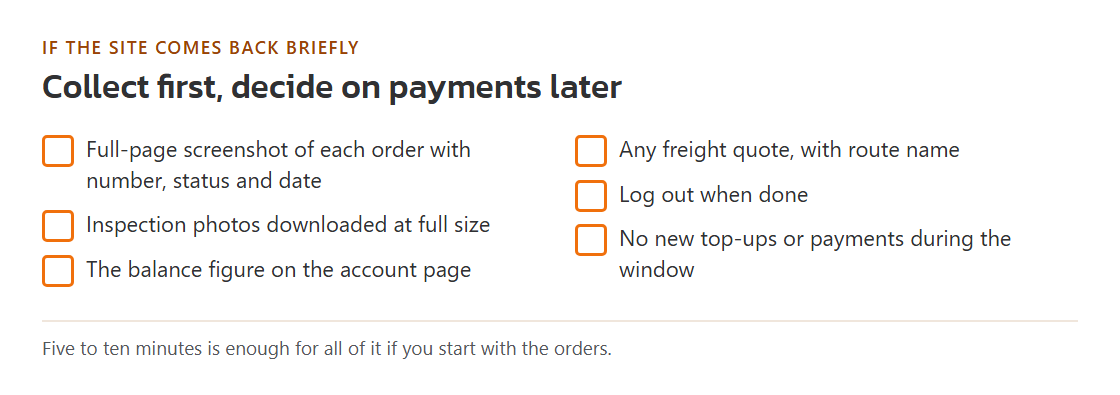
Sites that are failing often come back briefly. If that happens, spend the time collecting, not buying. Open each order and take a full-page screenshot that shows the order number, the status and the date. Download inspection photos at full size. Note the balance figure on the account page. Then log out. Paying a pending freight bill during a flicker is a judgement call: it may get goods moving, or it may send more money into a service that is about to vanish again. The storage page sets out what to weigh before deciding.