Lifeboat front page › Paid, not in storage, the page you are on now
Order stage two of four
Stage two: paid for, but not yet at the warehouse
The costliest stage to be caught in. Your money has left, the goods have not arrived anywhere you can see, and your own payment records now carry the whole order.
Signs the money left but the goods never arrived
You have a payment record for the goods, but no sign they reached the warehouse: no arrival email, no inspection photos, no weight. The agent may have bought the item and be waiting for the seller to post it, it may have bought nothing yet, or the seller's courier may be on the way. From the outside you cannot tell which, and that uncertainty is what this stage is about.
What is exposed at this stage
The full price you paid: goods, the seller's domestic shipping, and any handling fee the agent added. If the agent asked you to top up a price difference, that is exposed too. The goods themselves are either still with the seller or in transit inside China, addressed to a warehouse you cannot reach. This is the stage where an outage costs the most and where your own payment records do most of the work.
Records worth keeping at this stage
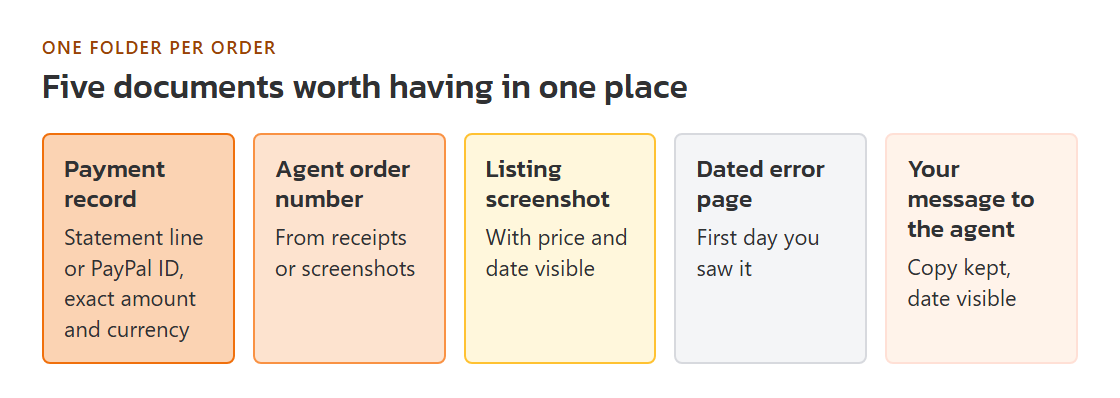
- The payment record for this order: card statement line, PayPal transaction ID, bank slip, or balance deduction email. Note the exact amount and currency charged.
- The agent's order number for each item. On Pandagoo's screens it was labelled "Order number", and payments carried a separate "Transaction order number".
- The listing link and offer ID, plus the price shown on the listing when you ordered. A screenshot with the date visible is better than memory.
- Any message asking you to pay a difference, and whether you paid it.
- If the order showed "Seller Sent": the seller's domestic tracking number, if the agent displayed one.
- A screenshot of the error page with the date and time, and a note of the day you first saw it.
Contact order once goods are paid for
- The agent, in writing, through every channel it ever used. One short message: order numbers, amounts, the date the site stopped working, and what you are asking for. Keep a copy. Its value is the date it carries; it shows you tried the merchant first, which many dispute processes ask about.
- Your payment provider. Ask what its process is when a merchant has stopped responding or delivering, what time limit applies to your payment, and what documents it wants. Do not wait weeks for the agent; time limits on these processes run from the payment or the expected delivery date, and the provider can tell you which.
- The seller, for information only. Through the marketplace's chat you can ask whether the order shipped and when. The sale was made to the agent's buying account, so any refund from the seller normally goes back to that account, not to you. The answer is still useful evidence of where the goods went.
Hold off on these for now
- Paying a "difference" request that arrives by email or chat from an address you have not seen before.
- Sending copies of your passport or ID to anyone offering help in a community group.
- Opening several disputes for the same payment with different providers. Pick the one that holds the payment.
Pandagoo at this stage, from the archive
Pandagoo called this the first payment: you paid for the goods and the agent bought them. Its saved text limits order handling to the Beijing working day, from 09:00 until 18:00 at UTC+8; an order paid at night would usually wait for the next working day before anyone bought it. Orders paid in the last days before the site stopped are the most likely to have never been placed with a seller at all.
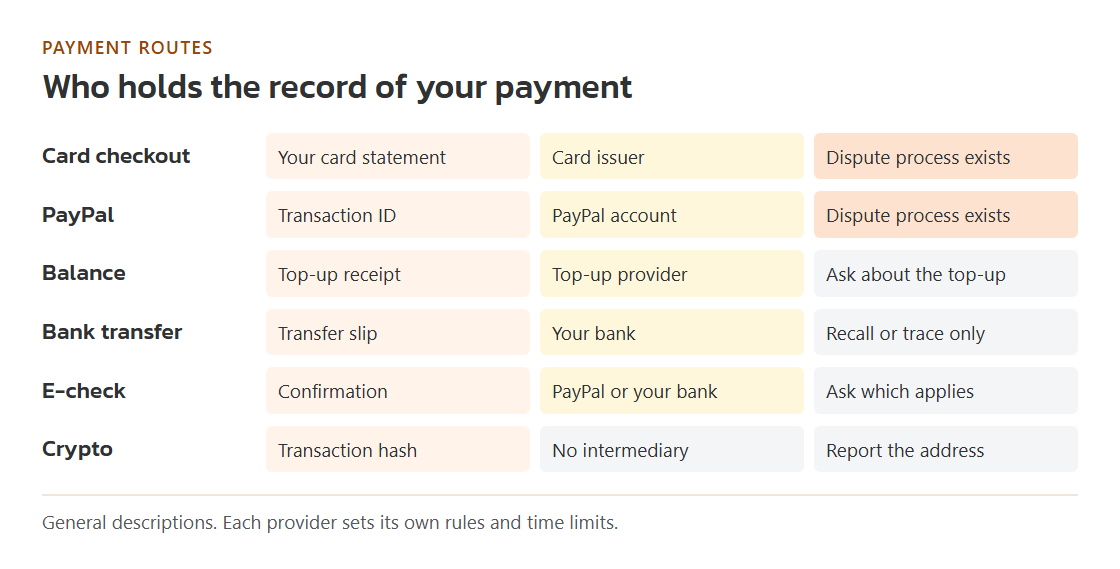
The archive lists four payment routes in its code: PayPal, Stripe card checkout, other card payment and cryptocurrency, plus the prepaid balance and international bank transfer. Each route leaves you a different record and a different party to ask; the outage kit builder sorts that out per route. Pandagoo's own screens are gone, so the record kept by whoever handled your payment is now the primary record of the order.